Screen recording to promoin under 5 minutes
Upload a recording of your app. Zodias renders a 1080×1920 promo with captions and music for TikTok, Reels and Shorts, and writes the post text. Add a promo whose style you like and the video follows it.
0:00
Example output. Green: the screen recording that was uploaded. Red: the promo Zodias rendered from it. Right: other versions of it.
Copy a styleyou already like
Upload a promo whose look you want. Zodias studies how it looks and moves, then renders your app the same way, with your screens, your words and your app's colours.
IN · the style reference
Drawn from the reference's traits
- Heavy capitals, one word on a colour blockReference: A lime blockYours: The app's own orange
- Tilted cards with thick bordersReference: Cream cardsYours: The app's dark cards, same tilt and border
- Chips that pop onto the cardsReference: A check chipYours: “You're in”, “Your trip preview”
- Near-black page, words top-left, screen belowReference: That layoutYours: The same layout
It takes the transitions and timing too. Nothing from the reference video itself appears in yours: the screens, words and colours are your app's.
OUT · your app in that style
Real Zodias output
The studio
Each app you promote is a project. Its videos, captions and script live on one screen.
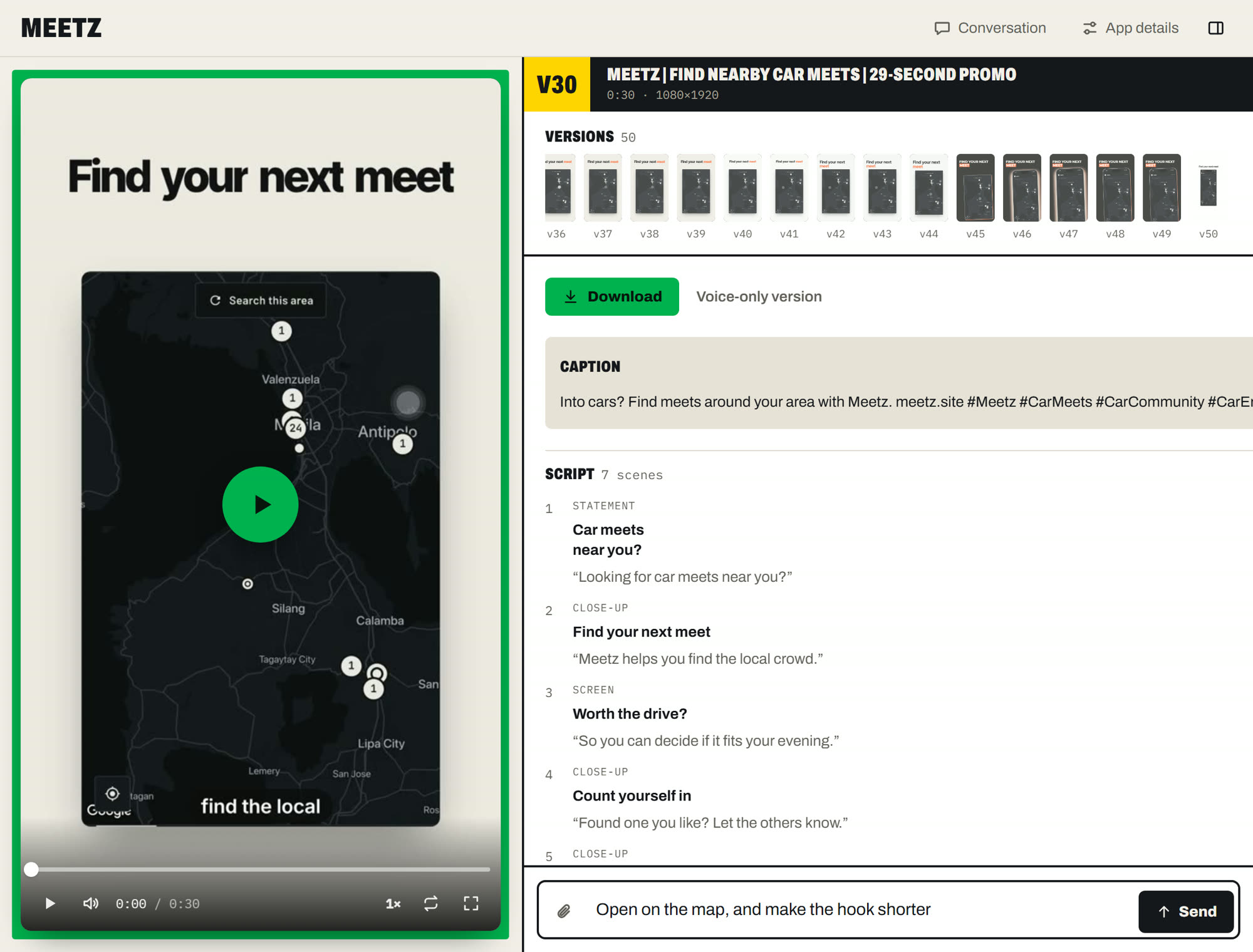
1Player
Plays the selected version.
2Versions
Every render is kept. Click one to open it.
3Caption
Post text for TikTok, Reels and Shorts, with the link and hashtags.
4Script
On-screen text and voiceover for each scene. You can edit it.
5Request box
Type a change. Sending it starts the next version.
One video, scene by scene
An example video and the scene plan Zodias wrote for it. Click a scene to jump to it. This one has music and no voiceover.
- Length
- 0:27
- Size
- 1080 × 1920
- Took
- 3 min 38 s
- Music
- Uploaded track
The TikTok caption it wrote
Find a nearby car meet, count yourself in, and check the drive. meetz.site #Meetz #CarMeets #CarCommunity #CarEnthusiasts
Changing a video
Type what you want changed. Zodias renders a new version and keeps the old ones. Example requests:
Steps
- 1RecordScreen-record your app, or upload screenshots. Optionally add a promo whose style you like. Hide personal data before you record.You
- 2PlanZodias picks the screens to show and writes the hook, on-screen text and post captions, in the reference's style if you added one.Zodias
- 3RenderCaptions, music timed to the beat, an optional AI voice, your app's colours. Usually under 5 minutes.Zodias
- 4ReviseType a change or edit the script. Each change renders a new version.You
- 5PostDownload the MP4 and post it yourself. Turn on the platform's AI-generated content label.You
Rules
- Scripts use presenter voice (“here’s an app that…”), never a made-up customer.
- Claims come only from your app details. No invented ratings, user counts or reviews.
- Every video comes with a reminder to turn on the AI-generated content label.
- Zodias never posts. You download the video and post it yourself.
Make your first video
Sign in with Google or GitHub, then upload a recording. The first version starts automatically.